
What You’ll Learn:
- How primary and secondary GBP categories directly influence your local search rankings
- Strategic frameworks for selecting the most impactful categories for your business
- Advanced optimization techniques including competitor analysis and seasonal adjustments
- Common mistakes that can tank your rankings and how to avoid them
- Maintenance best practices to keep your profile performing at peak levels
Key Takeaways:
- Your primary category is the single most important ranking factor you control
- Strategic use of up to 9 secondary categories can expand your visibility 200-300%
- Google updates their 4,000+ category list monthly—regular audits are essential
- Incorrect categories confuse Google’s algorithm and hurt rankings across the board
- Category changes may cause temporary ranking fluctuations but improve long-term performance
I’m Danielle Birriel, founder of D&D SEO Services with over 12 years of experience helping businesses implement affordable local SEO services that drive real results. My expertise in Google Business Profile optimization and AI-powered local search strategies has helped hundreds of service businesses dramatically increase their visibility and customer acquisition without breaking the bank.
Why GBP Categories Are Your Most Important Local SEO Decision
GBP categories and secondary categories affect rankings more than most business owners realize. Your category choices directly influence when and where your business appears in local search results, making them one of the most critical ranking factors in Google’s algorithm.
Here’s the impact breakdown:
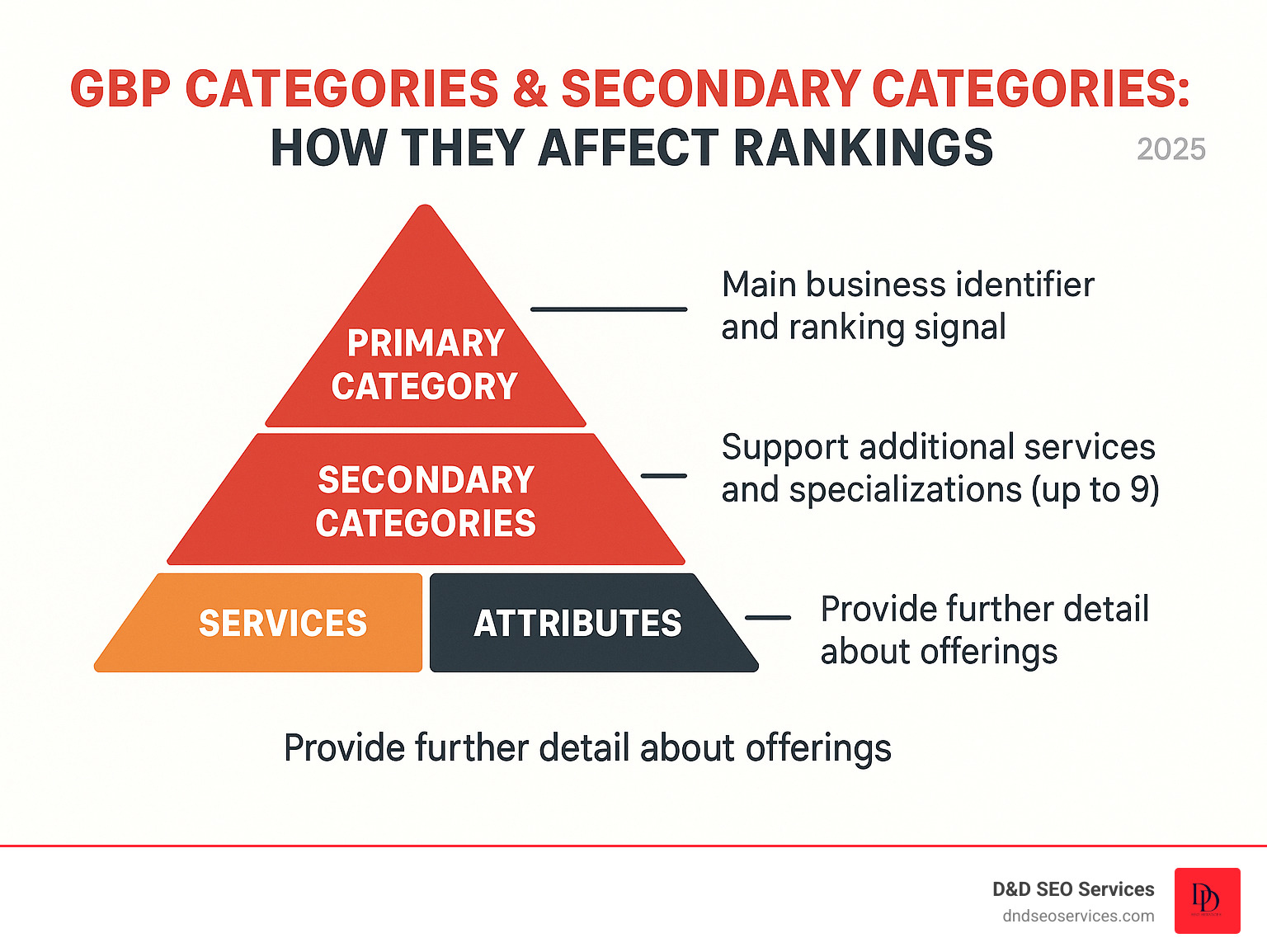
Primary category = Your main ranking signal that determines which searches you’re eligible for
Secondary categories = Help you rank for additional services and specialized searches (up to 9 allowed)
Ranking impact = Categories rank among the top 3 local SEO factors according to industry studies
Visibility boost = Correct categories can make you visible for 2-3x more relevant searches
Special features = Certain categories unlock booking buttons, menus, appointment scheduling, and other conversion-driving features
The stakes couldn’t be higher. Choose the wrong primary category and you might disappear from searches for your main service. Skip secondary categories and you’re leaving money on the table—missing opportunities to rank for specialized services that attract higher-value customers.
As of 2025, Google offers over 4,000 business categories, updating this list monthly. Many business owners either rush through this selection or never revisit their choices as their business evolves—a costly mistake.
I’m Danielle Birriel, and over my 12 years optimizing local search for hundreds of businesses, I’ve seen how GBP categories & secondary categories: how they affect rankings can make or break a local SEO strategy. Through D&D SEO Services, I’ve helped businesses increase their local visibility by 200-300% simply by optimizing their category selections and understanding Google’s category hierarchy.
The Core of Your Profile: Primary vs. Secondary Categories
Think of your Google Business Profile categories as the foundation of your online visibility. The primary category defines your core business identity, while secondary categories showcase your additional services. These aren’t just administrative labels—they’re direct signals to Google’s algorithm about when and where your business should appear in search results.
Understanding the Category Hierarchy
Every time someone searches for a business like yours, Google evaluates your categories first to determine relevance. When you choose accurate, specific categories, you accomplish two critical goals:
- Help Google understand your business – Clear categorization signals improve algorithmic confidence in your relevance
- Filter out irrelevant traffic – Specific categories attract qualified leads who actually need your services
This precision translates directly to better conversion rates. Visitors who find you through well-matched categories are significantly more likely to become customers.
The Primary Category: Your Business’s Foundation
Your primary category is the most important single decision you’ll make for your Google Business Profile. This choice carries more weight in Google’s ranking algorithm than almost any other factor you control.
Why It Matters So Much
Your primary category serves as Google’s primary signal for understanding your core business identity. When someone searches for exactly what you do, Google evaluates your primary category first to determine if you’re relevant enough to display.
Specificity wins: Choosing “Pizza restaurant” instead of the generic “Restaurant” category immediately communicates your specialty to both Google and customers, making you dramatically more relevant for specific searches like “pizza delivery near me” or “best pizza in [city].”
Beyond Rankings: Feature Unlocks
Your primary category doesn’t just affect rankings—it unlocks specific features within your profile:
- Hotels get star ratings prominently displayed
- Restaurants receive online ordering buttons and menu integration
- Service businesses can add booking links and appointment scheduling
- Retail stores may display product catalogs and shopping features
These features don’t just enhance your profile aesthetically—they directly impact conversion rates by reducing friction in the customer journey.
Selection Strategy
The key is maximum specificity while maintaining 100% accuracy. Following Google’s Guidelines on representing your business ensures you’re optimizing effectively while staying compliant.
Think like your customers: They’re not searching “business near me.” They’re typing “emergency plumber,” “family dentist accepting new patients,” or “organic dog grooming.” Your primary category must align with this actual search behavior.

The Strategic Role of Secondary Categories
While your primary category establishes your foundation, secondary categories are where you multiply your visibility. You can add up to nine additional categories, and most businesses should maximize this opportunity.
Expanding Your Reach
Secondary categories highlight specializations and supporting services that your primary category doesn’t cover. Think of them as casting a wider net without diluting your core message.
Real-world example: A general contractor might choose “General contractor” as their primary category. By adding secondary categories like “Kitchen remodeler,” “Bathroom remodeler,” “Deck builder,” and “Home builder,” they become visible for more specific, higher-intent searches that often drive premium projects.
Who Benefits Most
Certain business types see exceptional returns from strategic secondary category selection:
Multi-service businesses – Salons offering hair, nails, tanning, and spa services Professional practices – Law firms handling multiple practice areas Medical clinics – Practices with multiple specialties or types of practitioners Contractors – Companies offering various trade services Retail with services – Stores that also provide installation, repair, or customization
Debunking the “Category Dilution” Myth
A persistent myth warns that too many categories “dilute” your rankings. This is only true when you add completely unrelated categories to game the system. When you honestly describe all services you actually provide, relevant categories simply expand your reach and create more opportunities to connect with customers.
The bottom line: If you offer a service and there’s a category for it, add it. Your future customers are searching for those specific services, and secondary categories are often the only way they’ll find you.
A Strategic Guide to Selecting Your GBP Categories
Choosing the right GBP categories requires strategic thinking, not checkbox completion. The process balances what your business does with how your ideal customers search for it.
At D&D SEO Services, we analyze three critical factors:
- Your industry type and competitive landscape
- All services you offer (including seasonal variations)
- Your target audience’s actual search behavior
This holistic approach transforms categories from simple descriptors into powerful optimization tools engineered for maximum visibility and relevance.
Best Practices for Choosing Your Primary Category
Your primary category is the cornerstone of your GBP optimization. Follow these proven best practices:
1. Be specific—always
This is non-negotiable. Choose “Pizza restaurant” over “Restaurant,” “Personal injury attorney” over “Lawyer,” “Emergency dentist” over “Dental clinic.” Precision helps Google’s algorithm match your business to highly specific search queries, positioning you in front of ready-to-buy customers.
2. Think like a customer
What exact terms would they type when desperately needing your service? Align your primary category with these high-intent keywords. If you sell vintage comic books, people aren’t searching “retail store”—they’re looking for “comic book store.”
3. Consider profitability and demand
Choose the category for your most profitable or in-demand service. If an HVAC company makes 70% of its profit from heating work, “Heating contractor” should be the primary category, even if they do more AC service calls.
4. Follow Google’s guidelines religiously
Compliance keeps your profile in good standing and ensures your categories positively affect rankings. Google’s guidelines exist to maintain search quality—working with them, not around them, produces sustainable results.
For additional guidance: How to choose the right GBP category for your business.
How to Leverage Secondary Categories for Maximum Impact
Secondary categories are your secret weapon for capturing niche searches and expanding market reach. Here’s how to maximize them:
Multi-service businesses: A full-service salon should use “Hair salon” as primary, then add “Nail salon,” “Tanning salon,” “Spa,” “Eyelash salon,” and any other relevant services. Each category makes you eligible for different searches.
Professional practices: A law firm might use “Personal injury attorney” as primary (their most profitable work), but add “Car accident lawyer,” “Slip and fall attorney,” “Workers’ compensation attorney,” and “Wrongful death attorney” to capture the full spectrum of cases they handle.
Medical clinics: A general practitioner using “General practitioner” as primary can add specialists on staff: “Pediatrician,” “Internal medicine physician,” “Geriatrician,” or “Sports medicine physician.”
Contractors: An HVAC contractor should include “Air conditioning repair service,” “Furnace repair service,” “Air duct cleaning service,” “HVAC installation service,” and other specific services they perform.
Feature Unlocks Through Categories
Beyond ranking for more keywords, secondary categories can unlock unique GBP features:
- Hotels: Star ratings and amenity highlights
- Restaurants: Online ordering links and menu display
- Health & beauty: Appointment booking buttons
- Service businesses: “Appointment URL” attribute
- Events venues: Event listings and availability calendars
Strategically using secondary categories ensures you tap into every available feature to attract and convert customers.

Advanced Strategies: Category Analysis and Competitive Intelligence
Understanding how GBP categories affect rankings at an advanced level involves analyzing Google’s local filter, studying competitor strategies, and making intelligent seasonal adjustments.
Using Competitive Analysis to Inform Your Strategy
One of the most powerful optimization tactics is analyzing what works for top-performing businesses in your market.
Step 1: Identify top performers
Search for your primary service + location (e.g., “plumber Fort Myers”). Analyze the categories used by businesses consistently ranking in the top 3 of the Local Pack. This reveals Google’s preferred categorization for specific services in your market.
Tools to use:
- Phantom Chrome Extension (reveals all categories)
- Places Scout (bulk category analysis)
- Manual inspection (view page source on Google Maps listings)
Step 2: Identify strategic gaps
Compare your categories to competitors’ selections. Look for:
- More specific categories you haven’t added
- Secondary categories the top 3 consistently use
- Opportunities where competitors have missed relevant categories
Step 3: Test and refine
Implement changes and monitor rankings over 2-4 weeks. Google needs time to recalibrate your profile, but you should see movement within this timeframe.
At D&D SEO Services, our Local SEO Audit Process includes comprehensive category analysis. We use data-driven insights to recommend the most impactful selections for your business, whether you’re in Fort Myers, Los Angeles, or any market across the U.S.
Understanding Departments vs. Secondary Categories
It’s critical to distinguish between secondary categories and Google Departments. Confusion here can lead to guideline violations and profile suspensions.
Secondary categories describe additional services within a single business entity. They’re different services offered under one roof, one brand, one business.
Departments are distinct, public-facing business units that require their own separate GBP profiles. They’re independent operations that happen to be located within or affiliated with a larger business.
Examples of when to use Departments:
- A large gym with an independently operated café inside → Two separate profiles
- A car dealership with distinct new and used car sales departments → Separate profiles for each
- A hospital with an independent urgent care center → Two profiles
- A shopping mall with a separate food court management → Separate entities
The key distinction: If it has its own entrance, its own hours, its own phone number, or operates as a separate business entity, it needs its own profile. If it’s just another service you offer, it’s a secondary category.
For detailed guidance, refer to Google’s official documentation on departments.
Seasonal Category Optimization
For businesses experiencing significant seasonal demand shifts, dynamic category management can dramatically improve visibility during peak periods.
When to Adjust Categories Seasonally
HVAC contractors: In southern markets, prioritize “Air conditioning contractor” April-September. In northern markets, switch to “Heating contractor” October-March. This tells Google what service you’re actively promoting and captures high-intent seasonal searches.
Landscaping companies: Focus on “Lawn care service” spring/summer, switch to “Snow removal service” in winter (in applicable climates).
Tourism & recreation: A haunted house attraction should switch to the most specific seasonal category in September to capture October search volume. A beach equipment rental should prioritize those categories during summer months.
Event services: Wedding vendors might emphasize different aspects seasonally (outdoor wedding venue in summer, indoor options in winter).
Implementation Strategy
- Set calendar reminders 2-3 weeks before your peak season begins
- Make the switch gradually to monitor impact
- Update your description and posts to align with the category change
- Maintain the seasonal primary throughout the entire peak period
- Document results to refine strategy year over year
This proactive approach ensures you’re maximally visible when customer demand peaks. We help clients in markets like Fort Myers, Sarasota, and Tampa implement these dynamic strategies for year-round local search success.
Avoiding Pitfalls: Category Management and Maintenance
Managing your Google Business Profile categories isn’t a “set it and forget it” task. While the right categories can skyrocket your visibility, poor choices or neglect can quietly sabotage your rankings.
I’ve seen businesses lose 50% of their local traffic simply because they added irrelevant categories or failed to update their profile as their business evolved. The good news? Most category mistakes are easily preventable.
The Risks of Incorrect or Excessive Categories
The “more is better” fallacy
One of the biggest misconceptions is that adding more categories automatically increases visibility. This leads to category stuffing—cramming irrelevant categories hoping to capture extra traffic.
A pizza restaurant adding “Hair salon” or an accountant listing “Pet store” might seem harmless, but it creates serious problems:
1. Algorithm confusion: When you confuse Google with irrelevant categories, you muddy the signals about what your business actually does. Google’s algorithm relies on clear signals to understand your business and match you with relevant searches.
2. Diluted relevance: If categories don’t align with your actual services, Google struggles to rank you confidently for any search. Instead of ranking well for your core services, you end up ranking poorly for everything.
3. User-suggested edits: Google allows anyone to suggest changes to business profiles. Irrelevant categories are often the first thing locals notice and report. I’ve watched businesses lose carefully chosen categories overnight because users flagged them as incorrect.
4. Google penalties: Egregious category stuffing can trigger manual reviews and penalties, including profile suspension.
The solution: Choose precision over quantity. Use only categories that genuinely reflect your services, even if that means using fewer than the maximum allowed.
How Often Should You Update Your Categories?
Your Google Business Profile categories need regular attention. I recommend reviewing them quarterly, and here’s why this matters more than most realize.
Google updates categories monthly
As of 2025, there are over 4,000 available categories, with new ones appearing regularly while others get retired or merged. Recently, Google added specialized categories like “Vauxhall Dealer” for automotive businesses and refined restaurant subcategories.
Missing out on a new, more specific category could mean your competition gains an edge while you’re stuck with a broader, less targeted option.
Your business evolves
Maybe you’ve added a profitable new service line, discontinued an offering, or shifted your primary focus based on market demand. Your categories should reflect your current reality, not what you did two years ago.
I’ve helped businesses increase their local visibility by 200% simply by updating their primary category to match their most profitable current service.
Industry changes matter
New regulations, market shifts, or emerging services might make different categories more relevant. For example, “Telehealth service” became crucial for medical practices during recent years.
Action plan: Set a calendar reminder to review categories every three months. It takes 10 minutes but can make a huge difference in how GBP categories and secondary categories affect rankings for your business.
The Impact of Changing Categories
Many business owners avoid updating their categories because they’re worried about negative consequences. Let me clarify what actually happens.
Your reviews stay put (100% guaranteed)
This is the biggest concern I hear, and it’s completely unfounded. Changing categories—even your primary one—has zero impact on your existing reviews and ratings. Your hard-earned social proof remains exactly where it is, tied to your business profile, not your categories.
Re-verification might be required
Google may ask you to verify your business again if you make significant category changes, especially to your primary category. This is actually a good sign—it means Google takes accuracy seriously and wants to confirm legitimate businesses are making legitimate changes.
The process usually takes a few days and involves receiving a postcard with a verification code or a phone call. It’s a minor inconvenience for long-term gains.
Temporary ranking fluctuations are normal
When you change categories, Google needs time to recalibrate how your business fits into search results. This typically takes 1-2 weeks. You might see rankings drop temporarily before they stabilize or improve.
The temporary dip scares some business owners, but if your new category is more accurate and specific, you’ll usually see significantly improved long-term performance. I’ve watched businesses experience a 5-7 day ranking drop followed by 150-200% better visibility for their target searches.
How to make changes safely:
- Log into your Google Business Profile
- Navigate to the ‘Info’ section
- Click on your primary category or secondary categories
- Make your changes
- Save and monitor rankings for 2-3 weeks
For step-by-step instructions, visit: How to edit your Business Profile categories
Don’t let fear of temporary changes prevent you from making strategic improvements that could boost your local search performance for years to come.

Frequently Asked Questions about GBP Categories
How many GBP categories can I have?
Google allows one primary category and up to nine secondary categories for your business profile.
Your primary category is what Google considers your main business type and carries the most weight for rankings. It appears publicly on your profile, immediately communicating your specialty to customers.
Your secondary categories work behind the scenes to help you rank for more specific services and specialized searches. While less visible to customers, they’re incredibly valuable for expanding your reach in local search results.
Best practice: Use as many relevant secondary categories as possible. There’s no penalty for using all nine slots, as long as each genuinely describes a service you offer.
What if a perfect category for my business doesn’t exist?
This happens frequently, especially for newer or highly specialized businesses. When you can’t find that perfect match, choose the next best, most specific category available. It’s better to be close and specific than broad and generic.
For example: If you’re a mobile dog grooming service but can’t find that exact category, “Pet groomer” or “Dog groomer” (if available) would be better choices than the generic “Pet service.”
You can help shape future categories: Google regularly updates their category list based on market needs and user suggestions. While there’s no guarantee they’ll add your suggested category, submitting feedback contributes to the evolution of the system.
In the meantime: Use your services list, products section, and business description to provide additional detail about what makes your business unique. These elements, combined with the closest available category, help Google and customers understand your offerings.
Will changing my primary category hurt my rankings?
This is the most common question I receive, and I understand the concern. Here’s the complete truth:
Short-term impact: Changing your primary category will likely cause temporary ranking fluctuations as Google’s algorithm re-evaluates your profile. You might see rankings bounce around for 1-2 weeks while Google determines where you fit in its index.
Re-verification possibility: The change might trigger a re-verification request from Google—their way of ensuring changes are legitimate and authorized. While it’s a minor hassle, it’s not something to worry about from a ranking perspective.
Long-term outcome: If the new category is more accurate for your business, it should ultimately improve your rankings significantly. I’ve seen businesses make dramatic gains in local search visibility simply by switching to a more specific and relevant primary category that better matches search intent.
When to change:
- Your current primary category is too broad
- A more specific category now exists that better describes your business
- Your business focus has shifted to a different primary service
- Your most profitable service doesn’t match your current primary category
When NOT to change:
- You’re just experimenting without strategic reason
- The new category is less specific than your current one
- You’re trying to rank for something you don’t actually offer
The verdict: The temporary disruption is usually worth it for long-term gains—but make sure you’re changing to a category that truly represents your core business better than your current selection.
Can I use the same category as primary and secondary?
No. Google doesn’t allow you to duplicate your primary category as one of your secondary categories. This makes sense—your primary category already signals that specialty to Google, so duplicating it provides no additional value.
Instead, use your secondary category slots for related but distinct services or specializations that complement your primary category.
Do categories affect my rankings in Google Maps differently than regular Google Search?
Categories affect your visibility in both Google Maps and the Local Pack (the map results that appear in regular Google Search) the same way. They’re using the same underlying algorithm and ranking factors.
However, the behavior of searchers differs between these platforms:
- Google Maps users often browse categories directly or search with location-specific terms
- Google Search users typically use more specific service-focused queries
This means optimizing your categories helps you capture both types of searches, maximizing your total local visibility.
Will adding more secondary categories dilute my primary category’s effectiveness?
This is a myth that needs to be permanently debunked. Adding relevant secondary categories does NOT dilute your primary category’s effectiveness.
Why this myth persists: Years ago, some SEOs noticed that businesses with many unrelated categories seemed to rank poorly. But the issue wasn’t the number of categories—it was adding irrelevant categories that confused Google’s algorithm.
The reality: When you add secondary categories that genuinely represent services you offer, you:
- Expand the types of searches you’re eligible for
- Increase your overall visibility
- Maintain strong rankings for your primary category
Think of it this way: Your primary category is your foundation. Secondary categories are additional floors you can build on that foundation. They don’t weaken the foundation—they expand what you can accomplish with it.
How do I know if I’m using the right categories?
Great question. Here are several ways to evaluate if your categories are optimized:
1. Ranking check: Are you appearing in the Local Pack for searches directly related to your categories? If you’re “Pizza restaurant” but not showing for “pizza near me,” something’s wrong.
2. Competitor comparison: What categories are your top-ranking competitors using? If they’re all using a specific category you’ve omitted, that’s a red flag.
3. Click-through rate: If you’re ranking but not getting clicks, your category might be too generic or not matching user intent.
4. Conversion analysis: Are profile visitors converting to customers? If you’re getting traffic but few conversions, you might be attracting the wrong audience with mismatched categories.
5. Professional audit: A comprehensive local SEO audit can identify category optimization opportunities you might miss on your own.
Can I change categories based on what’s working for competitors?
Yes—competitive analysis is a legitimate and effective strategy. If you notice that top-ranking competitors in your area are all using certain categories, it’s a strong signal that Google views those categories as highly relevant for your industry in your market.
However, maintain accuracy: Only adopt categories that genuinely apply to your business. Copying a competitor’s category that doesn’t match your actual services violates Google’s guidelines and will hurt more than help.
Best approach: Use competitor categories as inspiration and validation, not as a complete template. Combine their insights with your unique service offerings to create your optimal category selection.
What happens if Google removes or changes a category I’m using?
Google occasionally retires categories, merges them with others, or renames them. When this happens:
Automatic migration: In most cases, Google automatically migrates your profile to the new equivalent category. You don’t need to take any action.
Notification: You should receive a notification in your Google Business Profile dashboard about the change.
Review and optimize: Use this as an opportunity to review all your categories and ensure they’re still the best choices for your business.
No penalty: You won’t be penalized for using a category that Google later removes or changes. The migration is handled algorithmically and doesn’t negatively impact your ranking history.
Conclusion: Mastering Categories for Local SEO Dominance
Understanding how GBP categories and secondary categories affect rankings isn’t optional—it’s fundamental to local SEO success. Your category selections are among the most powerful ranking factors you directly control.
We’ve explored how the primary category establishes your core identity in Google’s algorithm, while up to nine secondary categories capture niche searches and unlock conversion-driving features. We’ve covered advanced strategies including competitive analysis, department distinctions, and seasonal optimization tactics that give you a real competitive edge.
Just as important, we’ve addressed the maintenance side: avoiding irrelevant categories, conducting regular quarterly audits, and understanding the temporary impacts of making strategic changes. In Google’s dynamic ecosystem, continuous attention to your categories ensures your profile stays sharp, accurate, and primed to capture valuable local searches.
Your Action Plan
- Audit your current categories today – Are they as specific as possible? Do they match your most profitable services?
- Research your competitors – What categories are the top 3 businesses in your market using?
- Add missing secondary categories – Are you using all 9 slots for genuinely relevant services?
- Set a quarterly reminder – Review categories every 3 months to catch new options and ensure accuracy
- Monitor your results – Track ranking changes and traffic patterns after making category adjustments
Let’s Optimize Your Local Presence
At D&D SEO Services, we specialize in AI-powered local SEO, crafting custom strategies to ensure your Google Business Profile categories are perfectly aligned with search behavior and Google’s algorithms.
By choosing and managing your categories strategically, you’re providing Google with the precise signals it needs to rank you for the most relevant local searches. Don’t let your business get lost in the digital noise.
We’ve helped hundreds of businesses achieve 200-300% increases in local visibility through comprehensive category optimization and ongoing management.
Ready to dominate your local market? Let us conduct a comprehensive audit of your Google Business Profile and develop a custom category strategy designed for maximum visibility and conversions.
Optimize your local presence with AI-powered SEO strategies today
This guide is regularly updated to reflect Google’s latest category changes and local SEO best practices. Last updated: October 2025
The Strategist Behind D&D SEO Services
I’m Danielle Birriel, founder of D&D SEO Services. For over 12 years, I’ve been helping local service businesses—from plumbers and HVAC companies to medspas, dentists, and in-home care providers—outrank competitors, attract more qualified leads, and turn online searches into paying customers.
I’m not here to sell you “SEO in a box.” I’m here to solve real problems local business owners face every day:
- You’re buried on Google while competitors dominate the top spots.
- Your phone isn’t ringing enough despite having great services.
- Your Google Business Profile isn’t optimized and isn’t bringing in leads.
- You’ve been burned by agencies promising results but delivering cookie-cutter strategies.
- You don’t know if your marketing is actually working because you’re not getting transparent reporting.
I built D&D SEO Services to change that.